

Career Advisor | Help Videos
Video guides and resources for using your Career Advisor Dashboard
Help Using Your Coach Dashboard
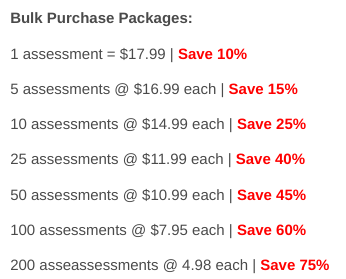
- Bulk Purchasing Career Tests — create a new Access Code or add credits to an existing one
- Send a career test using an Access Code
- Self-register for an assessment using your access code
- How do I view my client / student career test results?
- Renaming an access code to prevent further use
- Resend an examinee an email to take the assessment
- Editing your contact information and updating your profile
- Co-branding your school's logo within your students' Premium CareerFitter dashboards
- Reassigning an Assessment | Unused Access Code
- Features of the Career Advisor Dashboard
- View Examinee Results in the Affiliate Dashboard
- Video Tutorial for Access Code
- Renaming an Access Code Tutorial
Create Your Career Counselor Dashboard
- Career Counselor Dashboard Registration
- Bulk Purchasing at discounted rates
- Send assessments individually from your dashboard
- Allow groups to self-register with your access code
- View client and student assessment results
- Email notifications when assessments are completed
- No monthly costs
- Optional co-branding with your logo